Fall Off A Building on Mobile
The official description calls out a mobile ragdoll toggle. This page is that hangout, not a PC porting note.
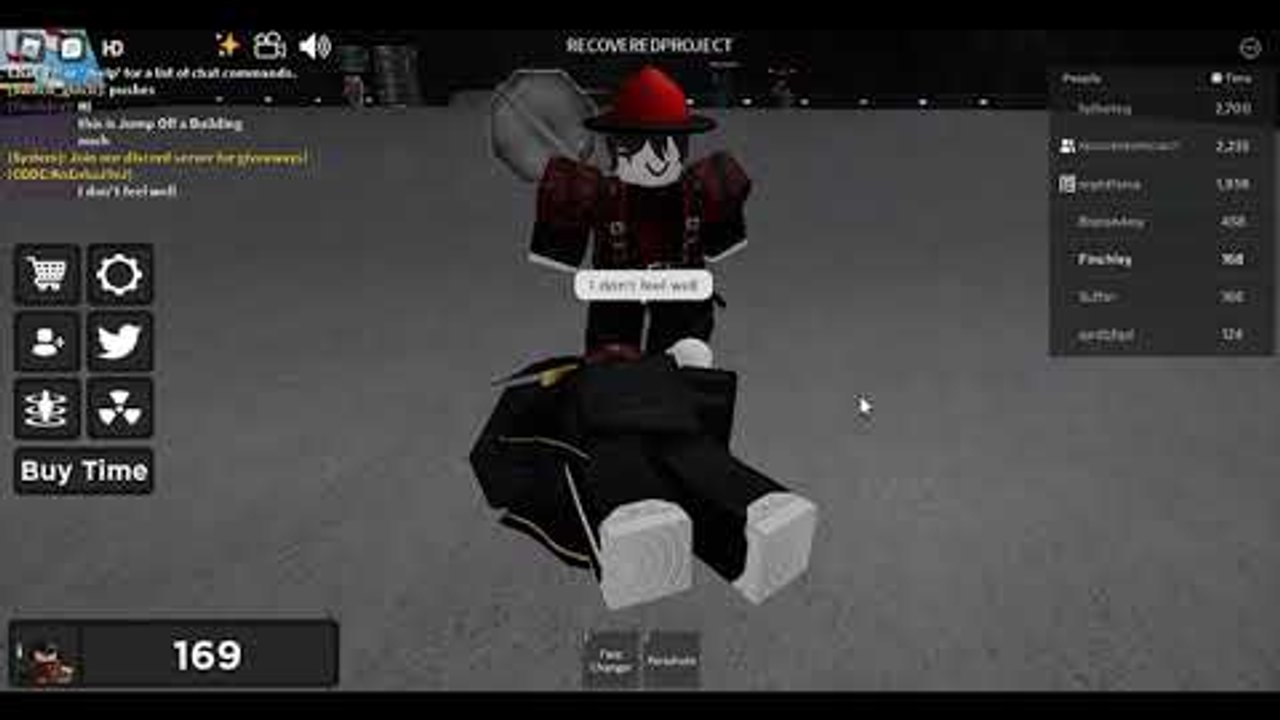
A large share of Fall Off A Building sessions are thumbs, not keyboards. The live Roblox description (updated 29 August 2026) lists two control lines and nothing else: PC presses R, mobile uses the on-screen toggle. If you opened this wiki on a phone because R did nothing, you are on the right page. Pair it with the full controls guide and the beginner loop.
The experience is MorphToR15, 20 players, no VIP servers. That last fact matters on mobile: you cannot buy a private instance to practice the vent in peace. You share the roof with whoever the matchmaker gives you, including push-happy PC players.
The ragdoll toggle
On touch, there is no R key. Look for a ragdoll control on the HUD — usually a labelled toggle rather than a jump button. Tap it before you walk off the ledge. If you jump first and toggle later, the flop can start late and you will look like you tripped on the parapet instead of committing to the fall.
When the toggle is on, movement is ragdoll, not walk. Strafing with the joystick while flopped is how people clip stairs and miss the vent room. Toggle off on landings if you need to enter a door (store, house, Time Room). Toggle on again at the next edge.
If the button is missing, you are probably on a copycat place. Confirm place ID 8416249767 and creator Adaks’s Developments. The official links hub has the only URLs that matter.
HUD that actually fits a phone
The right-hand People / Time board still exists on mobile. It is smaller. The bottom-left Time counter is the one to watch after you try FREE2000TIME. Buy Time sits as a shop icon, not a keyboard shortcut. The Codes icon is on the left cluster in current layouts — same tap path as how to redeem.
Camera: pinch to zoom out before a roof jump so you can see the street. A tight selfie cam makes the ledge unreadable and is why a lot of first mobile sessions look like accidental suicides off a texture seam. After you land, zoom in only if you are lining up a doorway.
Reset / leave: use the Roblox menu, not a guessed keybind. Fully leave the experience if a patch (animations menu, animated Push Tool) is missing. Soft reset does not always pull a post-29-August-2026 server.
Group tool on the Roblox app
The free Push Tool is a group join, not a code. On the app: open Adaks’s Developments, join, then leave the experience completely and rejoin 8416249767. Staying in the same server after a group join is the number one mobile failure mode. The tool is now fully animated; if your push is a still pose, you are on an old replica.
Ultra Push (299 Robux) is a separate pass. Do not buy a discontinued “Push Access” listing from a reseller. Mobile can equip Ultra Push the same as PC once owned.
Codes, Time, and thumbs
The live description no longer prints FREE2000TIME. Older blurbs and third-party lists still name it. Open the Codes box anyway, type it exactly, Redeem. If the box errors, the string is expired — details on the codes hub. Do not paste ten Climb and Jump Tower codes into this UI.
Time still drips while you idle. 2x Time and the Time Room work on mobile. The Time Room is a ground-floor room, not a mobile-only shop. Quick Teleport (75 Robux) is the quality-of-life pass if walking the city on a small screen feels like work.
What is harder on a phone
- Vent crawl. Badge text: top of building, stairs, left vent. A fat thumb plus ragdoll-on will fail the trigger. Toggle off, walk, enter, then flop for the clip.
- Plane jump. The plane is not a Quick Teleport destination. You hunt it. A zoomed-out camera helps more than a fly script.
- Push fights. PC players have mouse aim. Expect to get launched. That is the hangout, not a reportable exploit.
- Admin / VIP. Those passes do not fix touch controls. They add tags and commands. Skip them until the sandbox already feels good.
Vehicles and flight on touch
Hyper Bike and Flyable UFO advertise mobile and PC in the store copy. Wings and Magic Carpet are 50 Robux flight. Official flight is a pass, not a loadstring. If you came here from a “universal fly” video, read the scripts hub for the risk note and then buy Wings if you only wanted altitude.
Floating vehicles were patched in an older description bullet. If a bike hovers through the pavement on your phone, rejoin. Do not assume mobile is uniquely broken.
A first mobile session that actually works
- Join 8416249767 from the official page, not a sponsored lookalike.
- Find the ragdoll toggle. Test it on the roof, not mid-air.
- Try FREE2000TIME. Check the Time counter.
- Join the group, fully rejoin, equip the Push Tool.
- One clean roof jump for Fell From Building — badge list.
- If you still have patience, stairs, left vent.
That is the same loop as PC, with the input swapped. The falling animations menu is a 2026 add; open it after you can ragdoll on command so poses have a body to play on. Like and favorite the experience if you want Adaks to keep shipping physics polish — that request is still in the live description, and the universe timestamp on 29 August 2026 shows the place is not abandoned.
Frequently Asked Questions
Quick answers for Fall Off A Building on Roblox.
Why doesn't R ragdoll on my phone?
R is PC. Mobile uses the on-screen ragdoll toggle listed in the official description.
Can I open a VIP server to practice the vent?
No. The universe has VIP servers disabled. Practice on public 20-player servers.
Does the Push Tool work on mobile?
Yes, after you join Adaks's Developments and fully rejoin the experience.
Where is the Codes button on a phone?
In the left HUD cluster in the current layout. Same box as on PC. See how to redeem.